> ## Documentation Index
> Fetch the complete documentation index at: https://docs.usekana.com/llms.txt
> Use this file to discover all available pages before exploring further.
# Simple Mode
## Description
The Simple Mode authorization of our Client SDK uses both the **identifier of the user** who you want to pull data for (ie. the `id` on a [User](/reference/admin-api-backend-reference/objects#user)) and a **Public** **API Key** to authenticate requests.
Your token should start with `pub_` and will end with a random 32-character alphanumeric string - for example: `pub_test_794df9bu824e7d0176e079940e0915le`.
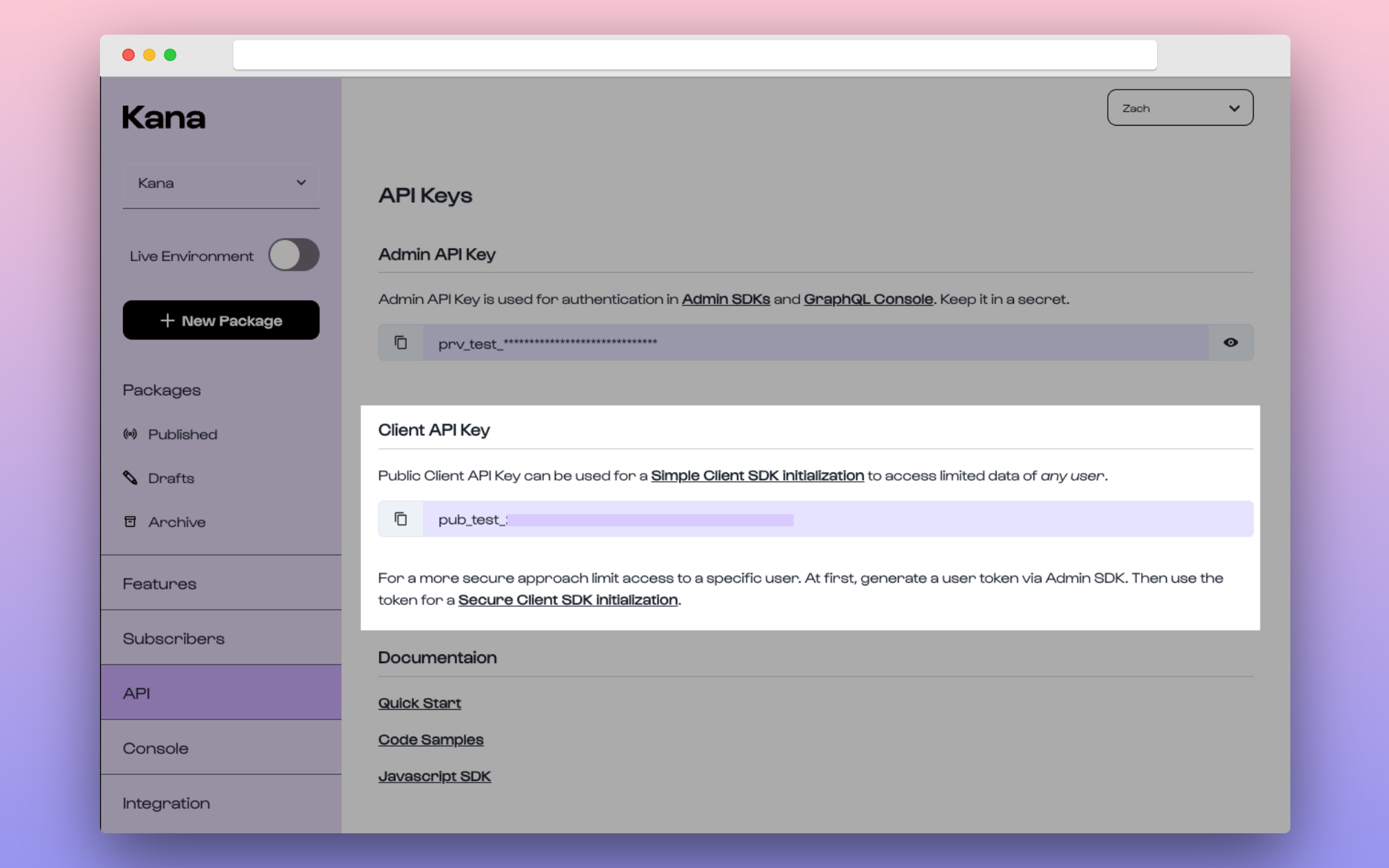 **Where can I get my API Key from?**
You can fetch this in the [Dashboard > API Keys](https://dashboard.usekana.com/apiKeys) section under the title of *"Client API Key"*.
Bear in mind that this is **separate from the Private Admin API Key** which is instead [used for the Admin API](/admin-api-backend/authorization-backend). Make sure not to get them mixed as it's *dangerous* to expose the Private Admin API Key.
## Using your key
You will need to provide both the Public API Key (as `apiKey`) and the `id` of the user that you want to pull data for (as `userId`) when initializing the client.
```javascript theme={null}
import { KanaUserClient } from "@usekana/client-kana-js";
const apiKey = "pub_live_xyz"; // Make sure this is your PUBLIC API Key
// Stored client-side to be assigned to this constant
const currentUser = {
id: "123456",
name: "Zach Read",
email: "zach@usekana.com",
};
const kanaUserClient = new KanaUserClient({
apiKey: apiKey,
userId: currentUser.id,
});
```
Make sure to replace the API Key with your own when using the above code
sample.
**Where can I get my API Key from?**
You can fetch this in the [Dashboard > API Keys](https://dashboard.usekana.com/apiKeys) section under the title of *"Client API Key"*.
Bear in mind that this is **separate from the Private Admin API Key** which is instead [used for the Admin API](/admin-api-backend/authorization-backend). Make sure not to get them mixed as it's *dangerous* to expose the Private Admin API Key.
## Using your key
You will need to provide both the Public API Key (as `apiKey`) and the `id` of the user that you want to pull data for (as `userId`) when initializing the client.
```javascript theme={null}
import { KanaUserClient } from "@usekana/client-kana-js";
const apiKey = "pub_live_xyz"; // Make sure this is your PUBLIC API Key
// Stored client-side to be assigned to this constant
const currentUser = {
id: "123456",
name: "Zach Read",
email: "zach@usekana.com",
};
const kanaUserClient = new KanaUserClient({
apiKey: apiKey,
userId: currentUser.id,
});
```
Make sure to replace the API Key with your own when using the above code
sample.